text-resizing
Mobile validation
Many people rely on larger text to read comfortably, and both Android and iOS let users change the default text size in their device settings. When an app sets fixed font sizes in code, or uses units that do not scale, the system setting does not apply, and the text stays small. Text must also not be cut off when it grows. When text is placed in a container with a fixed size, or limited to a single line, larger text may be clipped or truncated with an ellipsis, which is a loss of content. Let text containers grow, and allow text to wrap onto more lines.
Pass Patterns
Dynamic Fonts
Android
XML Views
The text size uses sp units, which scale with the user's font size setting.
<!-- TextView has a dynamic font size (sp) that scales with the user's font-size setting -->
<TextView
    android:layout_width="..."
    android:layout_height="..."
    android:text="Dynamic Fonts — Pass - 12sp"
    android:textSize="12sp"/>
iOS
The label uses a text style and adjusts to the user's Dynamic Type setting.
let summaryLabel = UILabel()
summaryLabel.text = "Order summary"
summaryLabel.font = .preferredFont(forTextStyle: .body)
summaryLabel.adjustsFontForContentSizeCategory = true
The text uses a text style, which adjusts to the user's Dynamic Type setting.
Text("Order summary")
    .font(.body)
Text Clipped
Android
XML Views
The text has no line limit, so it wraps onto more lines as it grows.
<TextView
    android:layout_width="..."
    android:layout_height="..."
    android:text="Your order will arrive within three to five business days." />
iOS
The label has no line limit, so it wraps onto more lines as it grows.
let deliveryLabel = UILabel()
deliveryLabel.text = "Your order will arrive within three to five business days."
deliveryLabel.numberOfLines = 0
The text has no line limit, so it wraps onto more lines as it grows.
Text("Your order will arrive within three to five business days.")
    .lineLimit(nil)
    .fixedSize(horizontal: false, vertical: true)
Fail Patterns
Dynamic Fonts
Android
XML Views
The text size uses dp units, which will not scale with the user's font size setting.
<TextView
    android:layout_width="..."
    android:layout_height="..."
    android:text="Dynamic Fonts — Fail - 12dp"
    android:textSize="12dp"/>
iOS
The label is limited to one line and clips its text, so text is lost as it grows.
let deliveryLabel = UILabel()
deliveryLabel.text = "Your order will arrive within three to five business days."
deliveryLabel.numberOfLines = 1
deliveryLabel.lineBreakMode = .byClipping
The text uses a fixed font size, so it does not adjust to the user's Dynamic Type setting.
Text("Order summary")
    .font(.system(size: 17))
Text Clipped
Android
XML Views
The text is limited to one line, so it is truncated with an ellipsis as it grows.
<TextView
    android:layout_width="..."
    android:layout_height="..."
    android:text="Your order will arrive within three to five business days."
    android:maxLines="1"
    android:ellipsize="end" />
iOS
The label uses a fixed font size, so it does not adjust to the user's Dynamic Type setting.
let summaryLabel = UILabel()
summaryLabel.text = "Order summary"
summaryLabel.font = .systemFont(ofSize: 17)
The text is limited to one line, so it is truncated as it grows.
Text("Your order will arrive within three to five business days.")
    .lineLimit(1)
    .truncationMode(.tail)
Try It Yourself
Changing the text size
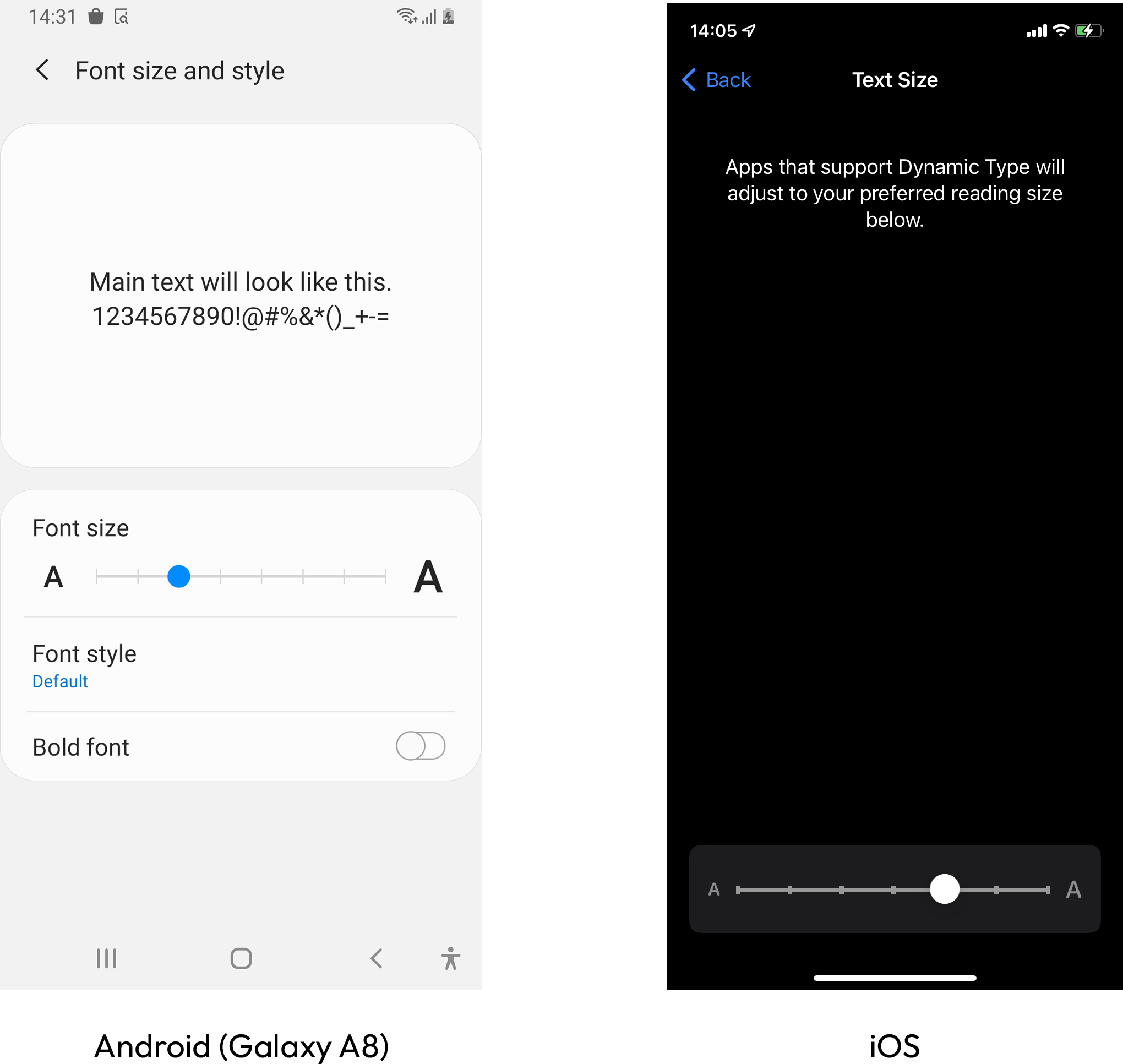
- iOS: Open Settings > Accessibility > Display & Text Size > Larger Text, and increase the slider value.
- Android: Open Settings > Accessibility > Display size and text, and increase the font size on the slider.
- Return to the app, and check the text on each screen.
Expected results: The app's text grows up to 200 percent, twice its original size, without loss of content or functionality. The result does not need to look perfect.
Actual results: Some text does not grow, or larger text is cut off, overlapped, or truncated with an ellipsis.
FAQ
How does this issue relate to 1.4.4 Resize Text?
SC 1.4.4 requires that, except for captions and images of text, text can be resized up to 200 percent without loss of content or functionality. When fixed font sizes ignore the system text size setting, or larger text is clipped or truncated, users cannot get readable text without losing content, so the criterion is not met.
Why is this issue marked as Serious?
People who need larger text may be unable to read the app's content or use its controls when text does not scale, or when it is cut off as it grows. This affects reading and tasks across the whole app, so it is rated serious.
Standards and Regulations
| Standard | Success Criterion | Reference |
|---|---|---|
| WCAG 2.2 | 1.4.4 Resize text (AA) | Except for captions and images of text, text can be resized without assistive technology up to 200 percent without loss of content or functionality. |
| EN 301 549 | 11.1.4.4 Resize text | Same as the WCAG text. |