non-interactive-in-focus-sequence
Mobile validation
Keyboard users expect an element that receives focus to do something. When a non-interactive element, such as a text label or an image, receives keyboard focus, the Tab key stops on it but nothing happens. Users may think the element is broken, and every extra stop makes reaching the actual controls slower and more tiring, especially for people with motor disabilities. Remove the setting that makes the element focusable. If the element is meant to be interactive, keep it focusable and give it the appropriate role instead.
Note: This validation is about keyboard focus only. Screen readers should still reach non-interactive text and images, because their users need to hear them.
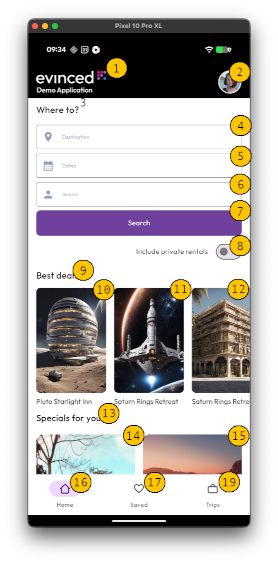
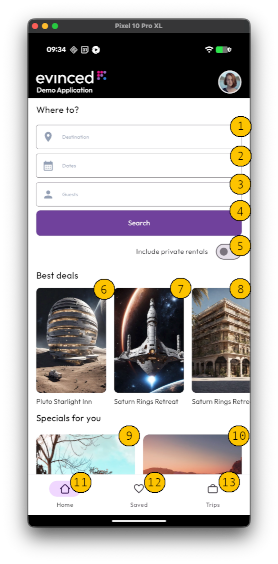
In the first example, the screen reader focus sequence includes every element with text or meaning, whether or not it is interactive. In the second example, the keyboard focus sequence includes only the interactive elements.
Pass Patterns
Android
The TextView is not focusable, so keyboard focus skips it.
<TextView
    android:layout_width="wrap_content"
    android:layout_height="wrap_content"
    android:text="Best deals" />
If the element is interactive, it stays focusable and an accessibility delegate gives it the button role.
ViewCompat.setAccessibilityDelegate(dealCard, object : AccessibilityDelegateCompat() {
    override fun onInitializeAccessibilityNodeInfo(
        host: View,
        info: AccessibilityNodeInfoCompat
    ) {
        super.onInitializeAccessibilityNodeInfo(host, info)
        info.className = Button::class.java.name
    }
})
The Text is not focusable, so keyboard focus skips it.
Text(text = "Best deals")If the element is interactive, it is clickable and has the button role.
Text(
    text = "View all deals",
    modifier = Modifier
        .semantics { role = Role.Button }
        .clickable { showDeals() },
)
Fail Patterns
Android
The TextView is focusable, but it is not interactive.
<TextView
    android:layout_width="wrap_content"
    android:layout_height="wrap_content"
    android:focusable="true"
    android:text="Best deals" />
The Text is focusable, but it is not interactive.
Text(
    text = "Best deals",
    modifier = Modifier.focusable(),
)
Try It Yourself
Using a keyboard
- Connect an external keyboard to the device. On iOS, also turn on Settings > Accessibility > Keyboards > Full Keyboard Access.
- Press Tab, or use the arrow keys, to move keyboard focus through the screen.
- Check which elements receive focus.
Expected results: Only interactive elements, such as buttons, fields, and toggles, receive keyboard focus.
Actual results: Non-interactive elements, such as headings, labels, or images, receive keyboard focus.
Tip: In some cases, an element receives focus but the focus is not visible. If pressing Tab seems to do nothing, focus may have moved to a non-interactive element without a visible focus indicator.
FAQ
How does this issue relate to 2.4.3 Focus Order
SC 2.4.3 Focus Order requires that keyboard focus moves in a logical order that preserves meaning and operability. Each stop in the tab sequence should be something you can operate and should help you complete the task.
When non-interactive elements receive keyboard focus, they insert stops that do nothing. This disrupts the expected order, causes confusion, and adds extra effort for keyboard users, including people with motor disabilities.
To meet 2.4.3, keep only interactive elements in the keyboard focus order. If an element is meant to be interactive, ensure it stays focusable and assign the correct role. Non-interactive content should remain available to assistive technology, but it should not be part of the Tab key sequence.
Why is this issue marked as Moderate?
It usually does not block task completion, but it makes keyboard navigation slower and more confusing. Users must move through extra stops and may try to activate elements that do nothing. The impact is greatest for keyboard users and people with motor disabilities, for whom every extra key press counts, so it is rated moderate.
Standards and Regulations
| Standard | Success Criterion | Reference |
|---|---|---|
| WCAG 2.2 | 2.4.3 Focus Order (A) | If a web page can be navigated sequentially and the navigation sequences affect meaning or operation, focusable components receive focus in an order that preserves meaning and operability. |
| EN 301 549 | 11.2.4.3 Focus Order | Same as the WCAG text. |