visible-labels

Elements that allow users input must have a visible label to indicate their context and purpose.

Who might be affected
Low Vision
Cognitive

Description

All text and form fields need a visible, permanent label to clearly identify their purpose. These labels should always be in close proximity to their associated fields, making their relationship obvious and ensuring users of magnifier software can perceive them together. A placeholder is not a valid substitute for a true label, as it disappears once a user enters a value, hindering their understanding of the field's purpose.

Quick Fixes

Ensure you provide a visible and properly positioned label for every form field, ensuring it's not a placeholder (attribute), and its association with the input is immediately clear to all users.

Fail Patterns
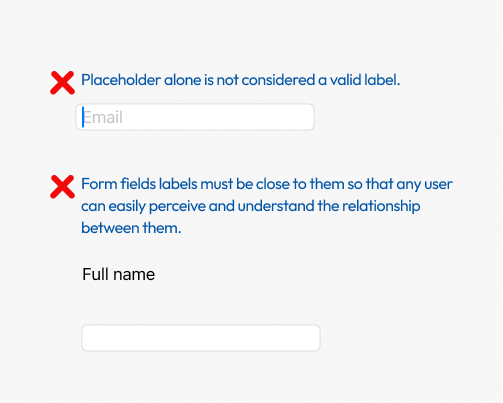
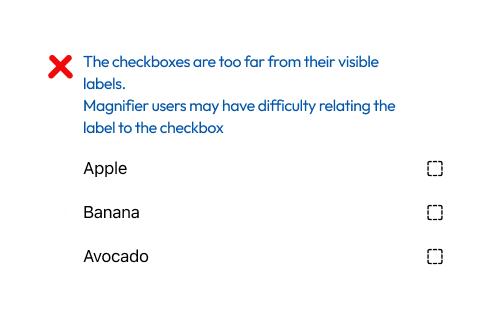
Two text fields that appear one above the other. The first text field has only a placeholder with no other visible label. A red X appears above the text field with the text next to it: "Placeholder alone is not considered a valid label." The second text field has a visible label but it is located a significant distance above it. The text above the second text field says: "Form fields labels must be close to them so that any user can easily perceive and understand the relationship between them." Three checkboxes, each with a label. The first is apple, the second is banana, and the third is avocado. The labels are to the left of the checkboxes but spaced apart. Above the checkboxes group is the following text: "The checkboxes are too far from their visible labels. Magnifier users may have difficulty relating the label to the checkbox".

Pass Patterns

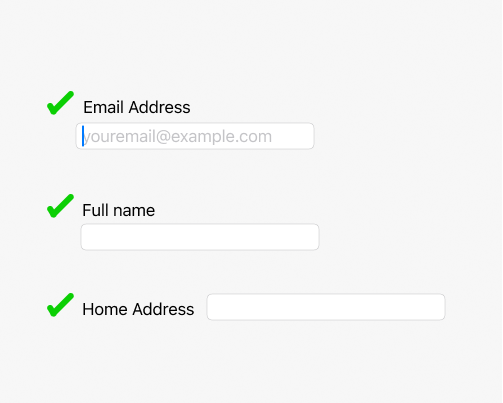
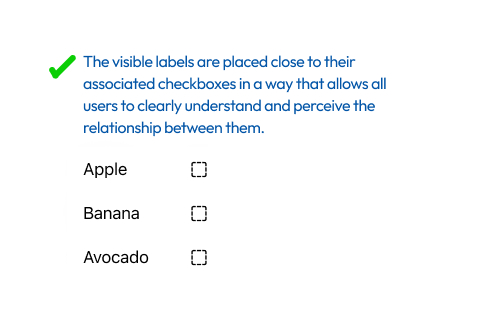
Three text boxes that demonstrate proper use of visible labels. The first field is for entering an email address, it has a visible label located adjacent to the text field above it. It says "Email Address." In addition this text field has a placeholder that displays an example of an email address format. The second field is for "Full Name," the visible label is located similarly to the email field, that field does not have a placeholder. The third text field is for "Home Address," in this case the visible label is located adjacent to the text field to its left. Three checkboxes, each with a label. The first is an apple, the second is a banana, and the third is an avocado. The labels are to the left of the checkboxes, in close proximity to them. Above the checkboxes group is the following text: "The visible labels are placed close to their associated checkboxes in a way that allows all users to clearly understand and perceive the relationship between them."

How Users Are Affected

Missing or poorly associated form labels create barriers for many users. Without clear, persistent labels, individuals struggle to understand a field\'s purpose, leading to confusion, errors, and form abandonment. This impacts users with cognitive disabilities, for whom disappearing placeholder text can cause significant confusion and memory strain. Additionally, users with low vision who use magnifier software may struggle with labels not in close proximity.

WCAG Success criteria

This issue might cause elements to fail one or more of the following Success criteria:
3.3.2 Labels or Instructions (A)