heading-order
Web validation
Headings outline the page for everyone. When their levels follow a strict numerical sequence, <h1>, then <h2>, then <h3>, and so on, screen reader users can jump through the content confidently, and sighted users get a clear visual hierarchy. Skipped levels or decorative heading markup break that outline and slow navigation, and compromise the clarity of the content hierarchy.
Pass Patterns
A cohesive outline keeps each level consecutive
The structure moves from h1 → h2 → h3 without skipping, so assistive technology users understand the hierarchy immediately.
<main>
    <h1>Campus Housing</h1>
    <p>Overview…</p>


    <h2>Residence Halls</h2>
    <h3>North Hall</h3>
    <p>Details…</p>


    <h2>Dining Options</h2>
    <p>Details…</p>
</main>
Fail Patterns
Jumping over a level confuses assistive technology and people who rely on it
Because the document goes straight from h1 to h3, screen reader users cannot tell whether content is a subsection of the previous heading or a new major section.
<main>
    <h1>Campus Housing</h1>
    <p>Overview…</p>


    <h3>Residence Halls</h3> <!-- skips h2 -->
    <p>Details…</p>
</main>
Try It Yourself
Using a screen reader
New to screen reader testing, or need a refresher?
Review this article first: Practical guides for using screen readers
- Open the page in a desktop screen reader.
- Open the screen reader’s elements list (NVDA
Insert+F7, VoiceOverControl+Option+U), and go to the “Headings” section.
Expected result: Headings on the list have a consecutive order like in the image below.
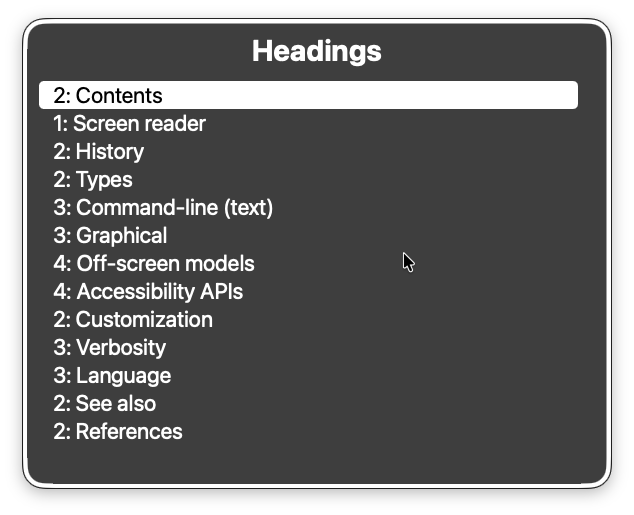
Actual result: Headings on the list do not have a clear order and hierarchy.
FAQ
Why is this validation considered a best practice?
WCAG doesn’t mandate sequential heading order, yet consecutive levels make pages easier to navigate and understand, especially for screen reader users. Following this rule therefore improves usability even when strict conformance isn’t required.
Why is this issue marked as Moderate?
Skipped levels rarely block access entirely, but they slow users who navigate by headings and can cause significant cognitive load. Most browsers and assistive technologies still expose the headings, so the impact is moderate rather than critical.