non-Interactive-in-focus-sequence
Elements that do not have interactions should not be keyboard focuable.
Description
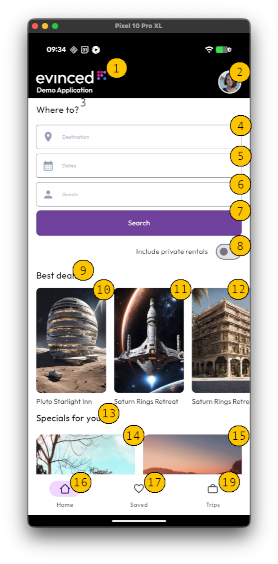
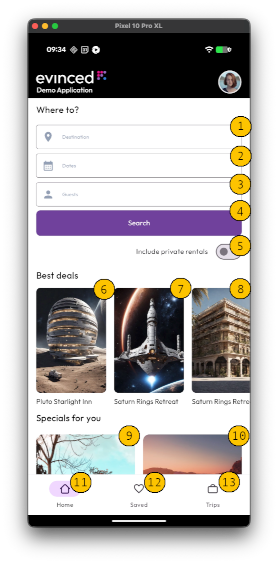
Non-interactive elements (like labels) should not receive keyboard focus. Either remove the flag allowing this to be focusable, or assign a role with the interaction. Users affected are those who use keyboard and switch devices, and those with motor related disabilities.
TalkBack Focus Sequence
Keyboard Focus Sequence
Quick Fixes
Ensure that significant changes to the interface (like the ones detailed above) only occur when the user actively triggers them, for example, by pressing a button or a key like Enter or Space. They must never be the result of an element simply receiving focus.
Note: Screen readers do need to be able to focus on these types of elements
Pass Patterns
If the element is supposed to be non-interactive:
XML Views (XML)
1android:focusable="false"
XML Views (Kotlin)
1element.focusable = View.NOT_FOCUSABLE
XML Views (Jetpack compose)
1// Prevent component from being focused2 modifier = Modifier3 .focusProperties { canFocus = false }
If the element is interactive, add a role. In this example, the Button role is being assigned
XML Views (Kotlin)
1ViewCompat.setAccessibilityDelegate(2 element, object : AccessibilityDelegateCompat() {3 override fun onInitializeAccessibilityNodeInfo(4 host: View,5 info: AccessibilityNodeInfoCompat6 ) {7 super.onInitializeAccessibilityNodeInfo(host, info)8 info.className = Button::class.java.name9 }10 }11)
XML Views (Jetpack compose)
1Modifier.semantics {2 role = Role.Button3}
How Users Are Affected
Keyboard and switch users do not receive additional information when an element receives focus, they assume that the element has some kind of interaction controls if it receives focus. If a non-interactive element receives focus, this can cause confusion and frustration for users who try to interact with the element.
If there are multiple non-interative focusable elements on the same screen, this can become problematic for users with motor or ambulatory related disabilites, as repetitive tab presses can be fatiguing.
WCAG Success criteria
This issue might cause elements to fail one or more of the following Success criteria:
2.4.3 Focus Order (A)
4.1.2 Name-Role-Value (A)