content-grouping
When elements form a single logical unit, they should be exposed to assistive technologies as such
Who might be affected
Screen Reader
Description
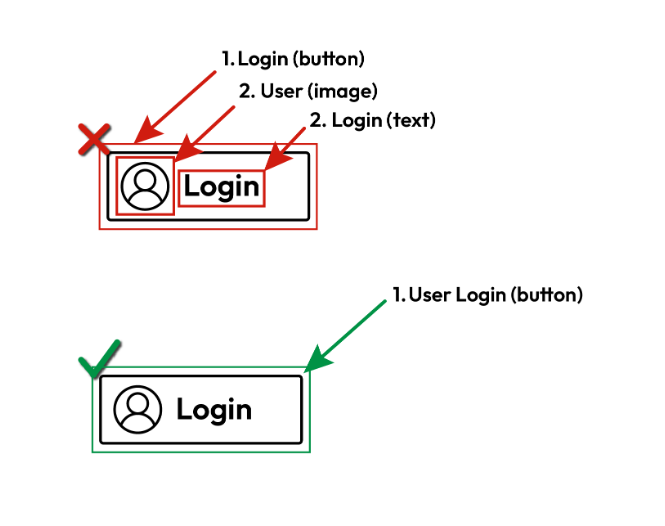
Elements and text nodes that make up a single logical unit (i.e., should be read in a flow to preserve the context and meaning) should be grouped in a way that assistive technologies such as screen readers will read them correctly.
Quick Fixes
Set the accessibility label for every interactable element
Android (.xml), pass:
1<LinearLayout2 android:id="@+id/message_container"3 android:layout_width="match_parent"4 android:layout_height="wrap_content"5 android:orientation="vertical"6 android:screenReaderFocusable="true">78 <TextView9 android:id="@+id/message_title"10 android:layout_width="wrap_content"11 android:layout_height="wrap_content"12 android:text="@string/message_title"13 android:focusable="false" />1415 <TextView16 android:id="@+id/message_body"17 android:layout_width="wrap_content"18 android:layout_height="wrap_content"19 android:text="@string/message_body"20 android:focusable="false" />21</LinearLayout>
Android (.xml), fail:
1<LinearLayout2 android:id="@+id/message_container"3 android:layout_width="match_parent"4 android:layout_height="wrap_content"5 android:orientation="vertical"6 android:screenReaderFocusable="true">78 <TextView9 android:id="@+id/message_title"10 android:layout_width="wrap_content"11 android:layout_height="wrap_content"12 android:text="@string/message_title"13 android:focusable="true" />1415 <TextView16 android:id="@+id/message_body"17 android:layout_width="wrap_content"18 android:layout_height="wrap_content"19 android:text="@string/message_body"20 android:focusable="false" />21</LinearLayout>
Android (Java), pass:
1LinearLayout messageContainer = new LinearLayout(this);2messageContainer.setId(R.id.message_container);3messageContainer.setLayoutParams(new LinearLayout.LayoutParams(4 LinearLayout.LayoutParams.MATCH_PARENT,5 LinearLayout.LayoutParams.WRAP_CONTENT6));7messageContainer.setOrientation(LinearLayout.VERTICAL);8messageContainer.setImportantForAccessibility(View.IMPORTANT_FOR_ACCESSIBILITY_YES);910TextView messageTitle = new TextView(this);11messageTitle.setId(R.id.message_title);12messageTitle.setLayoutParams(new LinearLayout.LayoutParams(13 LinearLayout.LayoutParams.WRAP_CONTENT,14 LinearLayout.LayoutParams.WRAP_CONTENT15));16messageTitle.setText(R.string.message_title);17messageTitle.setFocusable(false);1819TextView messageBody = new TextView(this);20messageBody.setId(R.id.message_body);21messageBody.setLayoutParams(new LinearLayout.LayoutParams(22 LinearLayout.LayoutParams.WRAP_CONTENT,23 LinearLayout.LayoutParams.WRAP_CONTENT24));25messageBody.setText(R.string.message_body);26messageBody.setFocusable(false);2728messageContainer.addView(messageTitle);29messageContainer.addView(messageBody);30
Android (Java), fail:
1val messageContainer = LinearLayout(this).apply {2 id = R.id.message_container3 layoutParams = LinearLayout.LayoutParams(4 LinearLayout.LayoutParams.MATCH_PARENT,5 LinearLayout.LayoutParams.WRAP_CONTENT6 )7 orientation = LinearLayout.VERTICAL8 importantForAccessibility = View.IMPORTANT_FOR_ACCESSIBILITY_YES9}1011val messageTitle = TextView(this).apply {12 id = R.id.message_title13 layoutParams = LinearLayout.LayoutParams(14 LinearLayout.LayoutParams.WRAP_CONTENT,15 LinearLayout.LayoutParams.WRAP_CONTENT16 )17 setText(R.string.message_title)18 isFocusable = false19}2021val messageBody = TextView(this).apply {22 id = R.id.message_body23 layoutParams = LinearLayout.LayoutParams(24 LinearLayout.LayoutParams.WRAP_CONTENT,25 LinearLayout.LayoutParams.WRAP_CONTENT26 )27 setText(R.string.message_body)28 isFocusable = false29}3031messageContainer.addView(messageTitle)32messageContainer.addView(messageBody)33
How Users Are Affected
Screen reader users will receive the content in a fragmented and unclear way, which may hurt understanding the meaning and purpose of the element.
WCAG Success criteria
This issue might cause elements to fail one or more of the following Success criteria:
1.3.2 Meaningful Sequence (A) | Apple Human User Interface Guidelines, Accessibility, Navigation