# Accessible Name

> User interface components that require an accessible name must expose a non-empty, programmatically determinable accessible name.

Source: https://knowledge.evinced.com/web/web-validations/accessible-name

User interface components that require an accessible name must expose a non-empty, programmatically determinable accessible name.

An accessible name is the text that assistive technology uses to identify a component's purpose. Buttons, links, form controls, and other interactive elements all need one, and this validation checks disabled controls too. The name comes from the computed accessible name. Common sources include `aria-labelledby`, `aria-label`, `alt`, `title`, a native `label`, button text, and visible text content. When an element has no accessible name, assistive technology may announce only a role, such as “*button*” or “*edit text*”. That leaves users without enough information to understand or operate the control.

Voice control software also relies on the accessible name: it's the phrase users say to activate a control. In the example below, the voice control software labels the named button "Submit", but can only mark the unnamed button with a question mark.
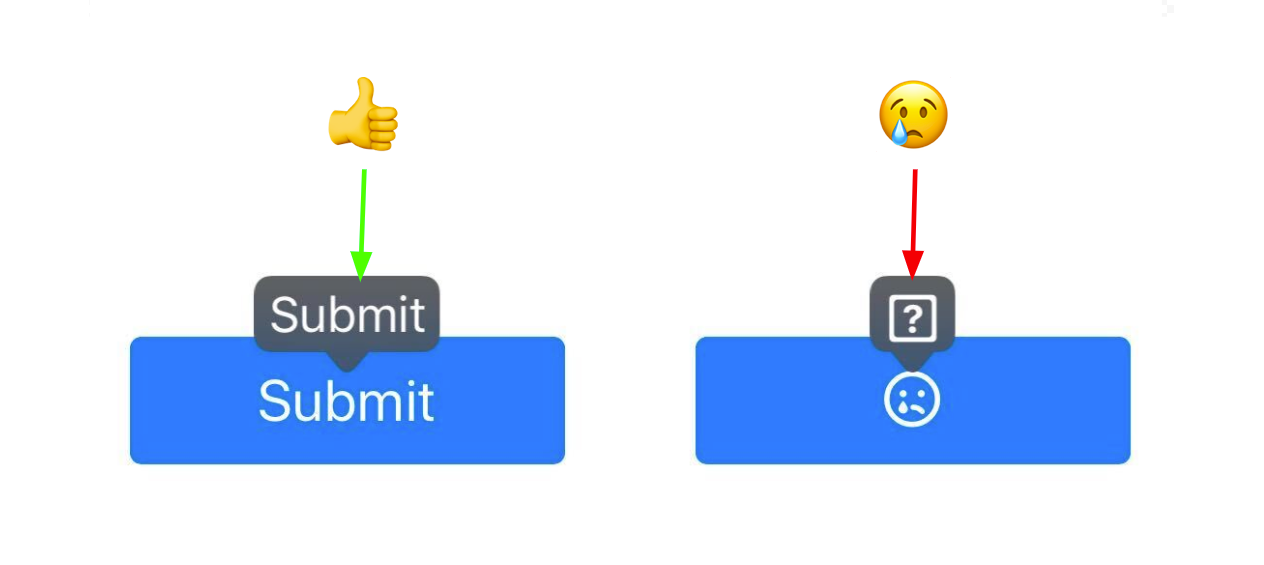
![iOS Voice Control labels on two buttons. The button with visible text is labeled Submit, while the icon-only button with no accessible name is labeled with a question mark.](https://knowledge.evinced.com/images/web/web-validations/accessible-name/accessible-name-vc.png)

## Pass Patterns

### Button with visible text

The visible text gives the button a programmatically determinable accessible name.

```html
<button type="button">Save changes</button>
```

### Icon button named with `aria-label`

The `aria-label` names the icon-only button, since its visible content is hidden from assistive technology.

```html
<button type="button" aria-label="Open settings">
    <svg aria-hidden="true" focusable="false"></svg>
</button>
```

### Form field with an associated label

The `<label>` is linked to the input through `for` and `id`, so the field has an accessible name.

```html
<label for="email">Email address</label>
<input id="email" type="email" />
```

## Fail Patterns

### Icon-only button with no name

The only content is an `aria-hidden` icon, so the button exposes no accessible name.

```html
<button type="button">
    <svg aria-hidden="true" focusable="false"></svg>
</button>
```

### Icon-only link with no name

The link contains only a hidden icon and no text, so it exposes no accessible name.

```html
<a href="/settings">
    <svg aria-hidden="true" focusable="false"></svg>
</a>
```

### Form field with no label

The text input has no associated `<label>`, `aria-label`, or `aria-labelledby`, so it has no accessible name.

```html
<input type="text" />
```

## WCAG techniques

### Sufficient techniques

-   [ARIA14: Using aria-label to provide an accessible name where a visible label cannot be used](https://www.w3.org/WAI/WCAG22/Techniques/aria/ARIA14)
-   [ARIA16: Using aria-labelledby to provide a name for user interface controls](https://www.w3.org/WAI/WCAG22/Techniques/aria/ARIA16)
-   [G108: Using markup features to expose the name and role, allow user-settable properties to be directly set, and provide notification of changes](https://www.w3.org/WAI/WCAG22/Techniques/general/G108)
-   [H44: Using label elements to associate text labels with form controls](https://www.w3.org/WAI/WCAG22/Techniques/html/H44)
-   [H65: Using the title attribute to identify form controls when the label element cannot be used](https://www.w3.org/WAI/WCAG22/Techniques/html/H65)
-   [H91: Using HTML form controls and links](https://www.w3.org/WAI/WCAG22/Techniques/html/H91)

### Failure techniques

-   [F68: Failure of Success Criterion 4.1.2 due to a user interface control not having a programmatically determined name](https://www.w3.org/WAI/WCAG22/Techniques/failures/F68)

## ACT Rules

-   [Button has non-empty accessible name](https://www.w3.org/WAI/standards-guidelines/act/rules/97a4e1/)
-   [Link has non-empty accessible name](https://www.w3.org/WAI/standards-guidelines/act/rules/c487ae/)
-   [Form field has non-empty accessible name](https://www.w3.org/WAI/standards-guidelines/act/rules/e086e5/)

## Try It Yourself

### Using a screen reader

**New to screen reader testing, or need a refresher?**  
Review this article first: [Practical guides for using screen readers](https://knowledge.evinced.com/a11y-essentials/practical-guides-for-using-screen-readers)

1.  Load the page and open a screen reader.
2.  Move to the target control.
3.  Listen to the name and role that are announced.

**Expected results:** The screen reader announces a clear name and role, such as “*Save changes, button*”.

**Actual results:** The screen reader announces only a role, an unclear symbol, or no useful name.

![Two VoiceOver announcements. For a button with the text Submit, VoiceOver announces "Submit, button". For an icon-only button with no accessible name, it announces only "button".](https://knowledge.evinced.com/images/web/web-validations/accessible-name/accessible-name-sr.png)

### Inspecting the browser dev-tools

1.  Inspect the target element in your browser's dev tools.
2.  Open the Accessibility panel.
3.  Check the computed Name value for the element.

**Expected results:** The computed Name value contains text that identifies the element's purpose.

**Actual results:** The computed Name value is empty or does not identify the element's purpose.

## FAQ

**How does this issue relate to 4.1.2 Name, role, value?**

SC 4.1.2 requires user interface components to expose a name that can be programmatically determined. When a button, link, or form control has no accessible name, assistive technology cannot reliably identify its purpose.

**Why is this issue marked as Critical?**

Users may be unable to tell what an interactive element does before using it. A missing accessible name can block key tasks, especially when the element submits data, closes a dialog, or controls important page behavior.

## Standards and Regulations

| Standard | Success Criterion | Reference |
| --- | --- | --- |
| WCAG 2.2 | [4.1.2 Name, Role, Value](https://www.w3.org/TR/WCAG22/#name-role-value) (A) | For all user interface components, the name and role can be programmatically determined; states, properties, and values that can be set by the user can be programmatically set; and notification of changes to these items is available to assistive technologies. |
| EN 301 549 | [9.4.1.2 Name, Role, Value](https://www.etsi.org/standards/etsi-301-549) | Same as the WCAG text. |
| Section 508 | [1194.21(d)](https://www.federalregister.gov/documents/2018/01/18/2018-00712/section-508-standards-update#d21) | Sufficient information about a user interface element including the identity, operation and state of the element shall be available to assistive technology. When an image represents a program element, the information conveyed by the image must also be available in text. |
| 508 Trusted Tester | [2.4.4-link-purpose, 6.A](https://section508coordinators.github.io/TrustedTester/links.html#check-244-link-purpose) | The purpose of each link or button can be determined from any combination of the link/button text, accessible name, accessible description, and/or programmatically determined link/button context. |
| 508 Trusted Tester | [1.3.1-programmatic-label, 5.C](https://section508coordinators.github.io/TrustedTester/forms.html#check-131-programmatic-label) | The combination of the accessible name, accessible description, and other programmatic associations (e.g., table column and/or row associations) describes each input field and includes all relevant instructions and cues (textual and graphical). |

## Personas impacted by this issue

-   [Screen Reader](https://knowledge.evinced.com/a11y-essentials/personas#screen-reader)
-   [Braille](https://knowledge.evinced.com/a11y-essentials/personas#braille)
-   [Voice Input](https://knowledge.evinced.com/a11y-essentials/personas#voice-input)

## Related Issues

-   [interactable-role](https://knowledge.evinced.com/web/web-validations/interactable-role)
-   [modal-lacks-an-accessible-name](https://knowledge.evinced.com/web/web-validations/modal-lacks-an-accessible-name)
-   [frame-title](https://knowledge.evinced.com/web/web-validations/frame-title)
-   [missing-contextual-labeling](https://knowledge.evinced.com/web/web-validations/missing-contextual-labeling)
